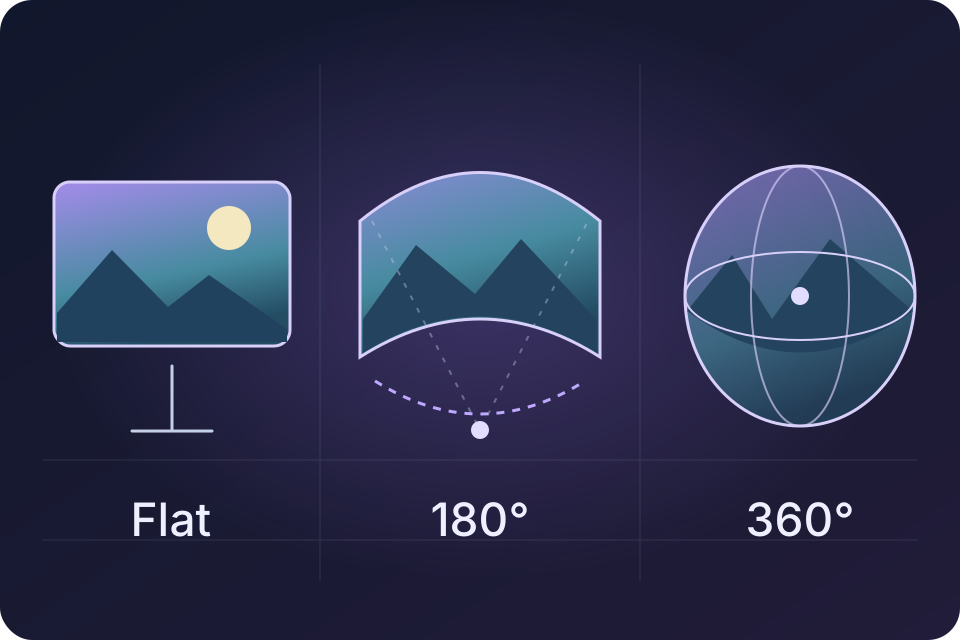
From a favorite photo to a scene that surrounds you. Flat, 180° and 360° photo and video viewing are available now in InfinitumView 1.0.1 for Apple Vision Pro.
Available now in Vision Pro 1.0.1.
View photos and videos in flat, 180° and 360° modes. No Companion, capture card or Developer Strap is needed for your local media. Spatial formats, online video links and library tools have their own statuses below. Check app availability →
Photos, video & projection
One file. The right view.
A scene’s field of view and its sense of depth are different things. A 360° image is not automatically stereoscopic, and a filename does not tell the player how to project a video.
Flat, 180° and 360° viewing geometry · illustration, not an app screenshot
Live in Vision Pro 1.0.1
Standard photos & local movies
Choose a photo or conventional video from Files or Photos. Standard Photo keeps the whole image visible on a flat, resizable screen. Local movies use the system player in a window.
No Companion, capture card or Developer Strap is needed for this local media route.
Compatible videos can carry their spatial presentation in embedded metadata. The development player uses that information to present depth where the asset and system support it.
Raw side-by-side or over-under files and manual eye-order controls are separate unfinished work. Apple Immersive Video also requires compatible assets and system support.
On Vision Pro, open InfinitumView’s Immersive Media section. Use version 1.0.1 or later for flat, 180° and 360° photos and video.
02
Choose your own file
Use Files or Photos to select a picture or video you can access. Start with Standard Photo or an ordinary local movie to confirm basic playback.
03
Use the matching presentation
Choose flat, 180° or 360° to match your photo or movie. Use a compatible file authored for the selected presentation.
For a black image, incorrect projection or playback failure, return to a standard file and note the source format, app version and what happened. Get support →
The media roadmap
A collection worth returning to.
Local viewing is the foundation. Organization and personalized environments are separate next steps.
Planned
A richer media library
Persistent organization, thumbnails, metadata browsing and broader subtitle workflows belong in the plan. Current local imports are temporary session files, not a permanent library.
Bring a user-approved 360° photo around an HDMI/UVC game screen. This needs separate integration and comfort testing beyond the released photo and video viewer.
No. 180° and 360° describe how much of the scene a picture or movie covers. Stereoscopic 3D uses separate views for the eyes. A media file needs the correct projection and stereo information; the player cannot establish those from its name alone.
Does every VR180 or VR360 file work?
Flat, 180° and 360° viewing are live, but support depends on the actual file, codec and projection. A filename alone does not establish compatibility. Raw side-by-side/over-under controls and manual eye-order tools remain separate unfinished work.
Are my local photos and videos uploaded?
InfinitumView’s local media path does not automatically upload your selected files to an Infinitum server. Files or Photos may retrieve a selection from your own cloud provider before the app opens it. Direct remote video is a separate development-only route.
Can I watch media while several devices share?
Simultaneous mixed-source workspaces—including wired and wireless devices—are planned. The custom panorama-around-game environment is also separate work. A media roadmap does not mean all combinations run together today. See the mixed-source plan.
Where can I learn about compatible immersive video authoring?
 InfinitumView